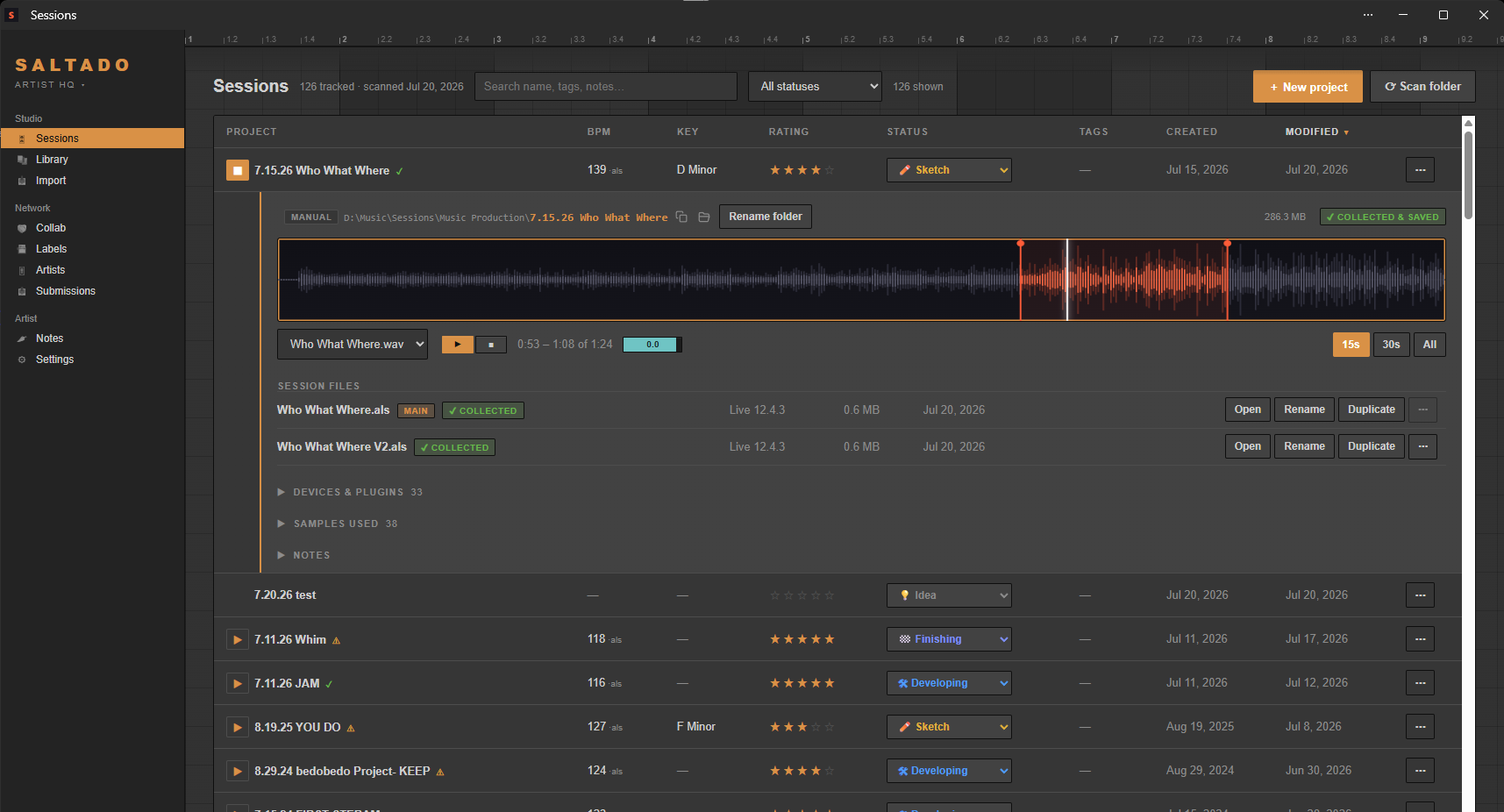
Sessions finds every project you've ever made and reads the BPM, key and
plugins straight from your files. Play any bounce without opening your DAW, keep a book of
labels, and track every demo you send, from sent to signed.
Built for Ableton Live. Core features work with FL Studio, Logic, REAPER, Studio One and more.
Different studios, different problems. Sessions is the front desk for all of them.
Named final_v3, scattered across three drives? Sessions finds every one, reads what's inside, and turns the pile into a searchable, playable library. Nothing moves unless you say so.
A label book with real submission routes, one-click sends that log themselves, and a tracker that flags who's ghosting you. Sent to signed, all in one place.
Know a session will open before you burn a night on it, and swap Plugin Passports to see whose plugins cross over — whatever either of you produces in.
Ableton, FL Studio, Logic, REAPER, Studio One: one library across all of them. Every project previews, opens and gets tracked from the same list.
No tagging, no manual import. Point it at your drive and it does the rest.
The setup wizard sweeps your drives for every session, sample pack, rack and plugin — whatever DAW you made it in. Confirm once and it takes over.
BPM and key straight out of the project file, plus the plugins and samples each project uses. Nothing is moved or changed.
Everything searchable and sortable in one place. Rate it, tag it, play the bounce, and track what you send to labels.
Deterministic, offline, and fast. Scanning is read-only: it never moves, renames or deletes a session unless you ask it to.
Point it at nothing: the setup wizard sweeps your drives for sessions — Ableton, FL Studio, Logic, REAPER, Studio One — plus sample packs, racks, Max for Live devices and plugins. Your installs and user libraries are found automatically; confirm once and it takes over from there.
BPM and key read straight out of the file. No tagging, no guessing. Ratings, statuses, tags, notes, and a status pipeline you can customize. Play your latest bounce on any track without opening your DAW.
Sessions is your demo pipeline too: a book of labels with their submission routes, genres and whether they're open to demos, plus a per-track tracker for every send. Sent, no reply, rejected, accepted, released. One click opens a label's demo route and logs it, and a submission with no reply after 30 days turns amber so you know who to chase.
Drop an .als someone sent you: every plugin it needs, and exactly which ones you're missing, before Live silently bypasses them. Ableton today, more DAWs next.
⚠️ Missing 3 of 12 pluginsExport your plugin collection as a tiny file. Swap with a collaborator and see what crosses over: both have / only them / only you. Works whatever either of you produces in.
New sample pack? Max for Live device? A Live set from a friend? Drop it on the Import page and it's filed, cataloged, and searchable automatically. Every import can be undone.
Your music never leaves your machine. No account, no cloud, no telemetry. Sessions reads your files where they sit: scanning changes nothing, and nothing moves unless you ask.
One library across every DAW you touch. Ableton Live has the deepest read today.
| Every DAW | What the format stores | ||||||
|---|---|---|---|---|---|---|---|
| Format | Open | Bounce preview | Tempo | Key | Plugins | Session versions | Sample check |
| Ableton Live.als | ✓ | ✓ | ✓ | ✓ | ✓ | ✓ | ✓ |
| FL Studio.flpBeta | ✓ | ✓ | ✓ | —FL stores no key | ✓ | —single file | — |
| Logic Pro.logicxBeta | ✓macOS | ✓ | ✓ | ✓ | —Logic hides them | —uses Alternatives | — |
| REAPER.rppBeta | ✓ | ✓ | ✓ | —no key stored | ✓ | ✓ | — |
| Studio One.songBeta | ✓ | ✓ | ✓ | —no key stored | ✓ | ✓ | — |
| Bitwig Studio.bwprojectBeta | ✓ | ✓ | ? | —no project key | ? | ? | — |
| Cubase.cprBeta | ✓ | ✓ | ? | ?root key, if you set one | ? | ? | — |
| Pro Tools.ptxBeta | ✓ | ✓ | ? | ? | ?closed format, the hard one | ? | — |
| GarageBand.bandBeta | ✓macOS | ✓ | ? | ? | —GarageBand hides them | ? | — |
Track unlimited projects free, forever, with the compatibility checker and Plugin Passport included. Pro adds bounce playback, your full library, and demo-submission tracking: one payment, yours to keep. Never a subscription.
Installers aren't code-signed yet, so Windows and macOS warn the first time you open one (macOS: System Settings → Privacy & Security → Open Anyway). Signing is on the roadmap.
Everything in Free, plus:
Yours forever. One payment, no subscription. No account needed. Your license key arrives by email straight after checkout; paste it into Settings. 14-day refund, no questions.
On top of Pro:
Cancel anytime. Everything it's already generated stays yours, you just stop getting new intelligence until you resubscribe.