
Find any project you have ever made, in seconds
You know it exists. You can hear the loop in your head. What you cannot do is find it, because it is somewhere across three drives in a folder you named at 2am two years ago. Sessions scans your whole computer, reads the BPM and key out of the project files themselves, and turns everything you have made into one searchable catalog.
The first twenty minutes, gone before you play a note
Ask producers where their studio time actually goes and you get the same answer. You sit down with an hour, open your file browser, and start clicking: Music, then Projects, then Projects old, then a folder called New Folder (2). Somewhere in there is the thing you wanted to work on. Ten minutes later you are still reading folder names.
Then comes the worse part. You open something that looks right and wait while it loads every plugin instance in the set, which can take several minutes on a big project, only to find it is not the one. It is the version before the one you liked, or a different song entirely that happened to share a name. So you close it and open the next candidate. By the time you find the real file, the idea that made you sit down has cooled off.
And underneath the "where did I save that project" problem sits a quieter one: you do not know which of your projects are worth finishing. A folder listing gives you a name and a date. It does not tell you that one of them is a 124 BPM idea in F minor that you rated four stars and left sitting at "arranged", one arrangement pass away from being done. That information exists. It is inside the project files. It is just not somewhere you can look at it.
One scan, and then you stop digging
The first thing the app does is sweep your drives for every project file on the machine: Ableton, FL Studio, Logic, REAPER and Studio One. Not a folder you nominate, the whole computer, including the ones you forgot about on the external drive. The scan is read-only: it opens files to read them and changes nothing, moves nothing and renames nothing.
Then it reads what each project already knows about itself. BPM comes straight out of the project file, along with the key where the format stores one, and the plugins the project loads. You do not tag anything. You do not fill in a form for 400 songs. That is the part that kills every "just be more organized" system: the tagging is work, and nobody keeps doing it. Reading the files is not work, so it stays accurate forever.
What you get is one list, sortable and searchable, with a row per project: name, BPM, key, length, DAW, when you last touched it, plus your own star rating, status, tags and notes. The status pipeline runs from idea to released (idea, sketch, developing, arranged, finishing, mixing, review, release ready, released) and it is fully customizable, so you can rename the stages, reorder them or add your own to match how you actually work. Search covers names, tags and notes together, which means a half-remembered phrase you typed in a note six months ago is a valid way to find a song.
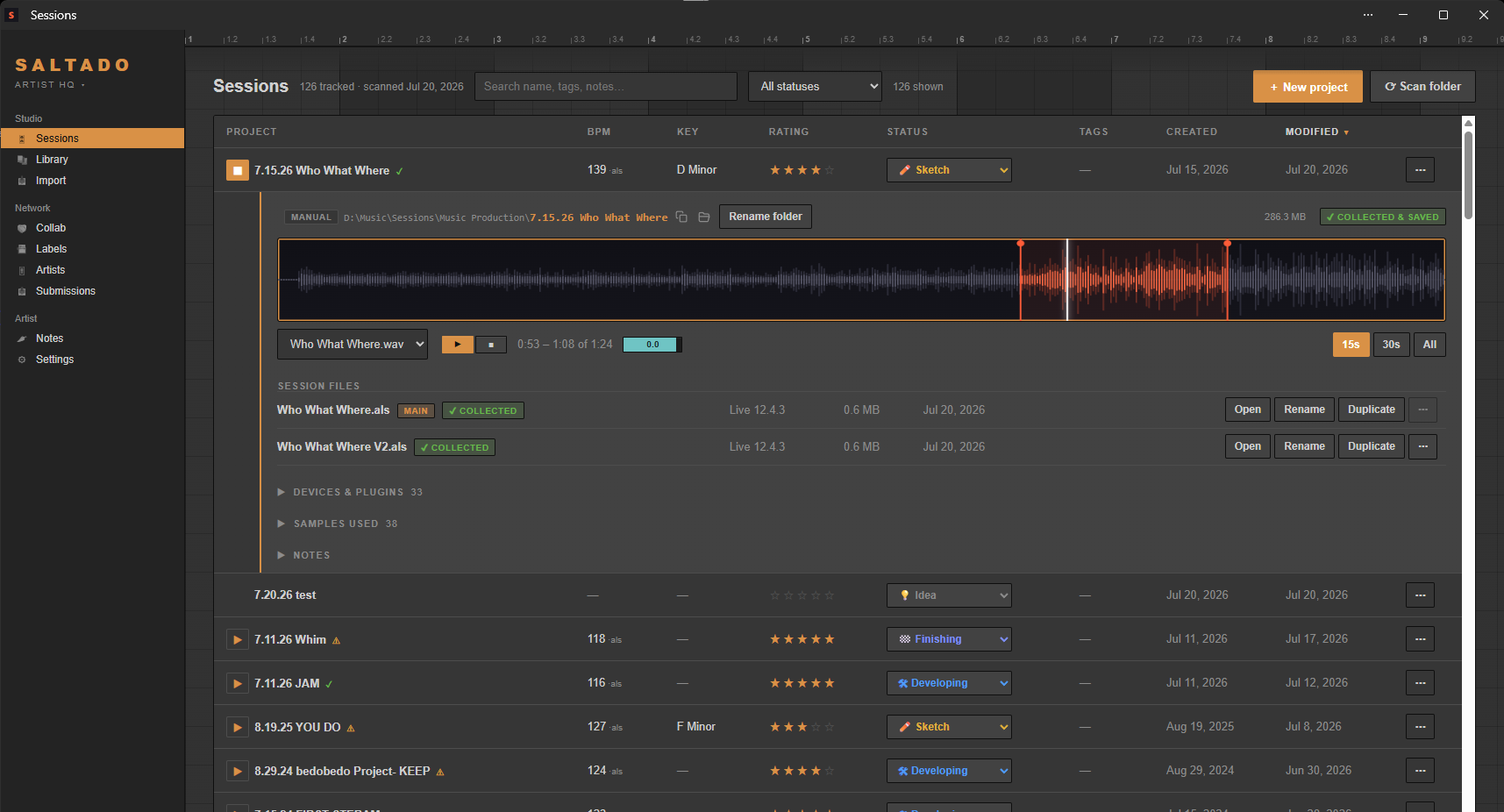
Eight ways to find the one you want
"Search my projects by BPM or key" turns out to cover about half of real searches, but not all of them. The point of a catalog is that any column is a way in:
- By name, including partial matches, so whim finds 6.13.26 whim v3 Project without you remembering the date prefix.
- By BPM, when all you know is that it was the fast one, or you need something at 140 to sit next to a track you are working on now.
- By key, for finding the two ideas that would actually mix together, or the one in G minor you wanted to borrow a bassline from.
- By plugin used, which answers "which project has that sound" better than anything else. If you remember it was that Diva patch or a specific Valhalla reverb, the plugin list per project is the search.
- By status, so "show me everything sitting at mixing" is one click instead of a memory exercise.
- By rating, which is how you find the good unfinished ones instead of reopening the same three projects forever.
- By how recently modified, for the "find that session from months ago" case where the date is the only real clue you have.
- By length, via a sortable Length column, useful for separating four-minute arrangements from eight-bar loops when you want to know what is genuinely near done.
Because it is one list, these stack. Four stars, over 100 BPM, status "arranged", not touched this year is a perfectly reasonable question to ask your own back catalog, and it usually returns exactly the song you should be finishing this week.
Your corrections stick
Sometimes the file is wrong or the project never had a proper tempo set. Type the BPM or key in yourself and it is marked as yours: rescans read the file again for everything else, but they will never overwrite a value you entered by hand. Same for ratings, statuses, tags and notes. You can rescan as often as you like, picking up new projects and flagging ones that have gone missing, without losing a single thing you typed.
What it reads from each DAW
Worth being specific, because this varies by format and nobody benefits from a vague promise.
Finding, previewing and managing project files works for all five DAWs: Ableton,
FL Studio, Logic, REAPER and Studio One. BPM is read from all five.
Key is read from Ableton and Logic only, because FL Studio, REAPER and Studio
One project files do not store a project key at all, so no tool can extract one.
Plugins are read from Ableton, FL Studio, REAPER and Studio One, but not Logic,
which keeps its plugin data in an opaque binary blob. The deeper Ableton-specific analysis
(missing samples, plugin compatibility, arrangement view and set vitals) reads
.als files, so it is Ableton only today.
This part is free, for unlimited projects
The scan, the searchable catalog, ratings, statuses, tags, notes, BPM and key, the sortable columns and the search itself: all free, with no cap on how many projects you have. Also free: the plugin compatibility checker and the Plugin Passport, plus the label book. Being able to find your own work is not a premium feature.
Pro is a $44 one-time purchase, never a subscription, and it buys the power tools rather than access to your own library: bounce playback Pro, the full studio library of samples, racks and presets Pro, the new project creator Pro, the drop-to-organize importer Pro, the duplicate finder Pro and submission tracking Pro. Pricing is on the pricing section.
It runs on your machine and only your machine. No account to create, no cloud sync, and nothing about your library leaves the computer. The catalog is a local database that you own.
Once you can find things, the cleanup gets easy
Searching your library and tidying it are the same problem seen from two angles, and the search is the honest first step: you cannot fix a mess you cannot see. When you are ready to go further, there is a walkthrough for cleaning up a messy Ableton library (missing samples, one-folder piles, duplicate samples) and a guide to organizing Ableton projects if you want the folder-structure theory. Or see everything the app does.