Saltado Sessions

Manage your sessions.
Track your demos.
Get signed.

Sessions finds every project you've ever made and reads the BPM, key and plugins straight from your files. Play any bounce without opening your DAW, keep a book of labels, and track every demo you send, from sent to signed.
Built for Ableton Live. Nine more DAWs work alongside it, from FL Studio to GarageBand.

Sessions Free Download for Windows Download for macOS Free, no account.
Sessions Pro Get Pro · $44 Early access · every update included.
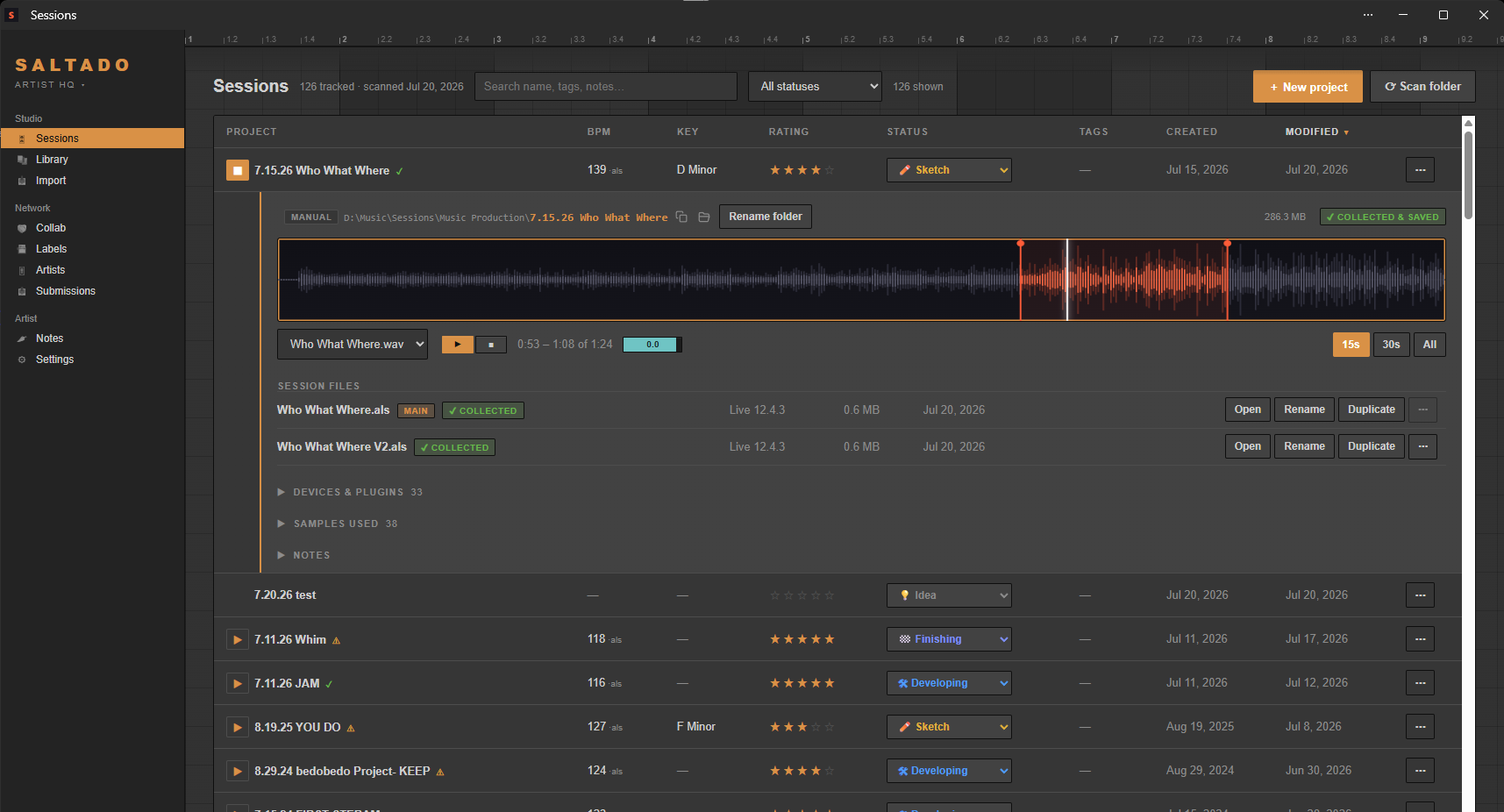
Saltado Sessions with a project expanded in the library: waveform preview with live loudness and stereo meters, project folder and vitals, session files with collected status, and the 146-project list behind it.
The actual app: 146 projects tracked, 9h 23m of music, sorted by last modified.
10 DAWs supported BPM, key & plugins read from the file 100% local, no sign-in One payment, yours forever

Whatever kind of producer you are

Different studios, different problems. Sessions is the front desk for all of them.

“My projects are a mess.”

Named final_v3, scattered across three drives? Sessions finds every one, reads what's inside, and turns the pile into a searchable, playable library. Nothing moves unless you say so.

“I'm sending demos into the void.”

A label book with real submission routes, one-click sends that log themselves, and a tracker that flags who's ghosting you. Sent to signed, all in one place.

“I make music with other people.”

Add the producers you work with as friends, and know a session will open before you burn a night on it: swap Plugin Passports to see whose plugins cross over, whatever either of you produces in. Send a track as a link anyone can play in a browser, and their notes land back on the project.

“I don't live in one DAW.”

Ableton, FL Studio, Logic, Pro Tools, Reason and five more: one library across all of them. Every project previews, opens and gets tracked from the same list.

See the full feature list →

Up and running in three steps

No tagging, no manual import. Open it and the setup wizard finds your projects.

1

Scan your computer

The setup wizard sweeps your drives for every project, sample pack, rack and plugin, whatever DAW you made it in. Confirm once and it takes over.

2

It reads every project

BPM and key straight out of the project file, plus the plugins and samples each project uses. Nothing is moved or changed.

3

Your library, organized

Everything searchable and sortable in one place. Rate it, tag it, play the bounce, and track what you send to labels.

SessionsProject management

Built like the DAW you already live in. Deterministic, offline, and fast. Scanning is read-only: it never moves, renames or deletes a project unless you ask it to.

Finds your world in seconds

Point it at nothing: the setup wizard sweeps your drives for projects (all ten DAWs, Ableton to GarageBand) plus sample packs, racks, Max for Live devices and plugins. Your installs and user libraries are found automatically; confirm once and it takes over from there.

Your projects, decoded

BPM and key read straight out of the file. No tagging, no guessing. Ratings, statuses, tags, notes, and a status pipeline you can customize. Play your latest bounce on any track without opening your DAW.

"Will this session open?"

Drop an .als someone sent you: every plugin it needs, and exactly which ones you're missing, before Live silently bypasses them. Ableton today, more DAWs next.

Missing 3 of 12 plugins

Plugin Passport

Export your plugin collection as a tiny file. Swap with a collaborator and see what crosses over: both have / only them / only you. Works whatever either of you produces in.

Drop it, it's organized

New sample pack? Max for Live device? A Live set from a friend? Drop it on the Import page and it's filed, cataloged, and searchable automatically. Every import can be undone.

Local-first, always

Your music never leaves your machine. The library, the database it lives in and every bounce it plays back all sit on your own drives, and Sessions reads your files where they already are: scanning changes nothing, and nothing moves unless you ask. The Vault below is the one exception, a separate opt-in subscription, and even then, nothing uploads unless you switch it on.

Sessions A&R + VaultDemos, labels and the Vault

Everything after the track is finished: your studio backed up, a book of labels with real submission routes, sends that log themselves, and a tracker that remembers who never wrote back. Some of it ships today in Pro, some in the optional A&R + Vault subscription, the rest is being built, and every block says which.

The Vault Being built

Your whole studio backed up online, and the same library opened on another computer. A standard backup is encrypted on the way up and encrypted where it is stored, and we hold the keys, which is what lets you browse it, download a file or send someone a folder from any computer. Send one track instead and it goes as a listen link: a page that plays the bounce in a browser, and the notes whoever you sent it to leaves come back into the app. Want a deeper lock? Mark a folder private and it goes into your Inner Vault, a vault inside the Vault: sealed on your machine before upload, and opened only by the passphrase you set and the recovery code you print. No backdoor, no reset. It is the only part of Sessions that will ever need an account, and it stays entirely optional: leave it off and the app uploads nothing, ever. Part of an optional subscription, not on sale yet.

A book of 1,200+ labels and outlets

Who they are, what genre they put out, and the story of where they came from. Labels and outlets are kept visibly apart, so you never pitch a radio show or a blog like an imprint. Where a label charges to listen, that is flagged before you send, and the flag is free: a pay-to-play warning behind a paywall reaches exactly the wrong person. Pro unlocks the known demo route on the ones that have one.

Research any label on demand Being built

Ask about a label the book has no route for, or one the book has never heard of, and it goes and finds the current demo route and contact and files them in your book. Each answer comes back with the link it came from, so you can check it rather than take it on faith. It runs on research credits instead of a flat unlimited promise, because every lookup is real work. Part of an optional subscription, not on sale yet.

Send demos, track every reply

One click opens a label's demo route and logs the send at the same time, so the tracker is never something you have to remember to update. Every send carries its own state: sent, no reply, rejected, accepted, released. A submission with no reply after 30 days turns amber so you know who to chase, and replies are timed so you learn who actually answers. Part of Pro.

It hears what you actually make Being built

Genre read from the bounce itself, not from a folder name or a tag you had to remember to type. It describes a track, it does not grade one, and it can name more than one thing at once, because most records do. It runs entirely on your computer: nothing is uploaded, and your music never feeds an online AI. It joins an optional subscription when it is ready.

Which labels fit this track Being built

Once Sessions knows what a track sounds like, it lines that up against the book and gives you a shortlist of labels working in the same lane, each one with the reason it is on the list, whether it takes demos, whether it charges, and its route. It narrows the book down to a handful worth your time. You still listen, you still decide, and you still write the message. The listening behind it runs entirely on your computer: nothing is uploaded, and your music never feeds an online AI. It joins an optional subscription when it is ready.

Your bounces on your phone Being built

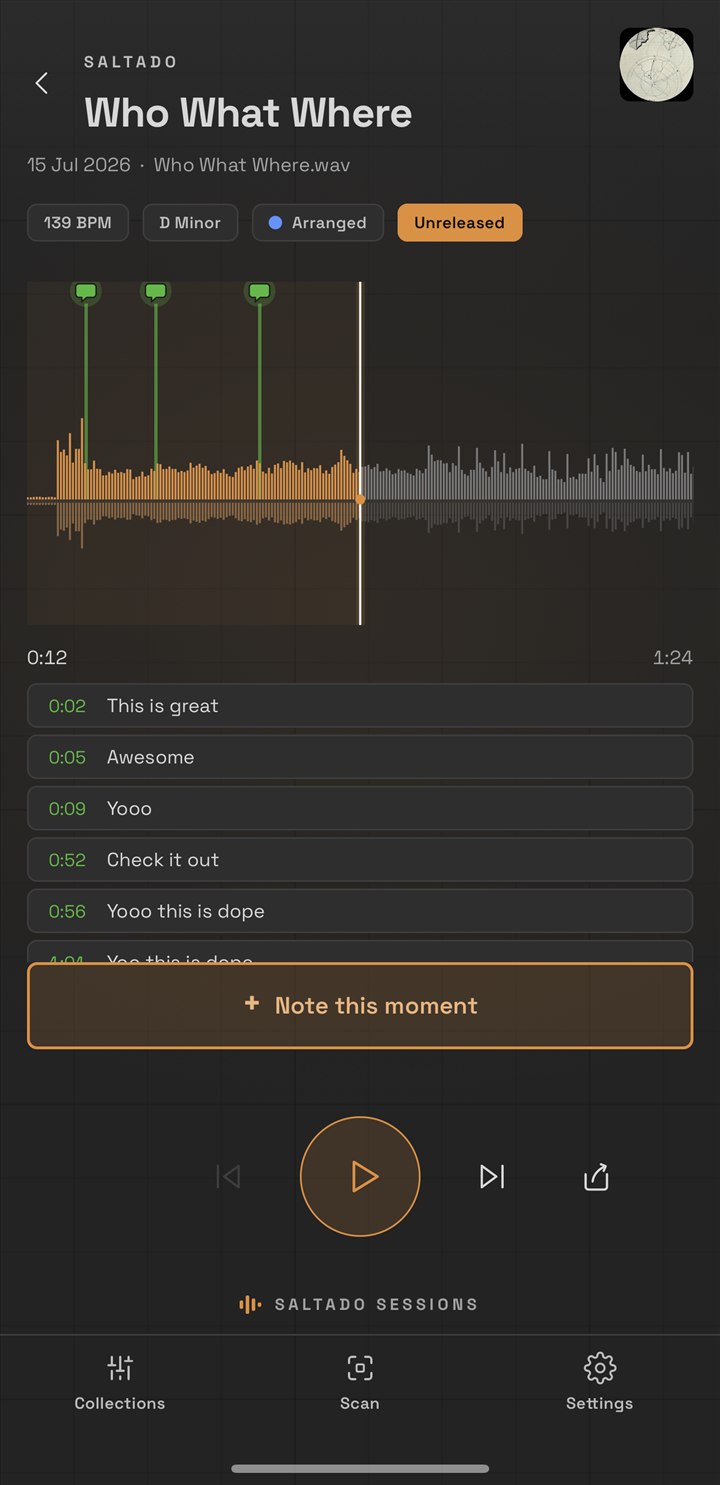
A phone app for the listening half of the job. It plays the bounces in your Vault, so the mix you finished last night is already in your pocket: in the car, on cheap earbuds, on the kitchen speaker, the places a mix actually gets judged. Nothing to export and nothing to copy across. Part of an optional subscription, and the app itself is a free download. All of it, in detail

See the full feature list →

What it reads, format by format

One library across every DAW you touch. Ableton Live has the deepest read today, and sets from any Live version get cataloged, a couple of the deeper reads need Live 12, noted in the table.

Every DAW What the format stores
Format Open Bounce preview Tempo Key Plugins Session versions Sample check
Ableton Live.als Live 12+
FL Studio.flpBeta FL stores no key single file
Logic Pro.logicxBeta macOS Logic hides them uses Alternatives
REAPER.rppBeta no key stored
Studio One.songBeta no key stored
Bitwig Studio.bwprojectBeta not stored in the project file no project key
Cubase.cprBeta not read yet not read yet
Pro Tools.ptxBeta closed format closed format closed format, the hard one
Reason.reasonBeta single self-contained file
GarageBand.bandBeta macOS GarageBand hides them one project package

Who made this

Sessions wasn't built by a software company that researched producers. It was built by a producer, for his own library, because it had got out of hand.

I'm Jules, I make music as Saltado, out of Austin, Texas. My projects folder had drifted to 146 of them: half-finished ideas with names like 6.13.26 - 122 - untitled, versions I couldn't tell apart, and tracks I genuinely forgot I'd made. Finding anything meant opening Live and waiting.

So I built the thing I wanted: something that reads the project files directly, tells me the tempo, the key, when I last touched it and what plugins it needs, and plays the bounce so I can hear it without opening anything at all. Then I added the part nobody else had: tracking which labels I'd sent what to, and what came back.

I use it every day. When something annoys me in it, I fix it that week. That's the whole reason it's worth paying for, it's not a side project I'll abandon, it's the tool I depend on.

Saltado Sessions is made by Saltado LLC, Austin, Texas. Questions go to a real inbox: [email protected].

Pricing

Free forever for the library. One payment for the power tools. The cloud half is the one subscription, and it is optional.

Free

Free

$0
  • Unlimited projects, all ten DAWs
  • BPM & key read from the file
  • Ratings, statuses, tags & notes
  • Compatibility checker & Plugin Passport
  • On the go: your library on a USB stick, ready for another studio
  • Local-first: no account, and nothing leaves your machine on its own
  • Friends: add the producers you work with, free for everyone
  • and more…
Free forever. No account, no card.
Early access

Sessions Pro

$44 one-time

This is the early-access price.

Pro includes your first month of A&R + Vault. During launch week you get an email with your claim link after you buy. The month starts when you claim it, at a $0 checkout that takes a card, and billing starts on day 31 at $14/mo unless you turn renewal off. Turning it off keeps the rest of the free month, and the 14 days to change your mind below close before any membership charge. How the timing works

Everything in Free, plus:

  • Bounce playback, without opening your DAW
  • Unlimited collections
  • Full library: plugins, samples, racks, presets
  • Cleanup tools: un-tangle, duplicates, importer
  • Every import and move undoable
  • and more…
Get Pro · $44

You'll sign in or create an account first, so your license stays manageable and re-downloadable. Then unlock the app either way: sign in once and Pro switches on by itself, or just paste your key.

14 days to change your mind. Email us and you get your money back, no questions and no form to fill in.

Yours forever. One payment, no subscription. The app itself never asks you to sign in.

Subscription · requires Pro

Sessions A&R + Vault

$14 per month

or $140 a year, which is two months free and Sessions Pro included.

A subscription, separate from Pro: it runs on servers we pay for monthly. Cancel any time.

Bought Pro? Your first month here is included. During launch week you get an email with your claim link after you buy Pro. The month starts when you claim it, at a $0 checkout that takes a card; billing starts on day 31 at $14/mo unless you turn renewal off, and turning it off keeps the rest of the free month.

Not on sale yet. The whole tier is a preview, the Vault included: nothing on this card can be bought today.

On top of Pro:

  • The Vault: your whole studio backed up online, encrypted on the way up and where it is stored
  • Any file size, 150 GB included. Only what changed is re-sent
  • Open your library on another computer, or browse, download and share it from any browser
  • Send a listen link: a page that plays a bounce in any browser, no account and no download, and the notes your friend leaves land back in the app
  • Soon Your bounces on your phone: an app that plays what is in your Vault. What it does
  • Soon Research any label on demand: its current demo route and contact
  • Soon Genre detection: it hears the genre and ranks the labels most likely to sign it
  • and more…
Coming soon

Entirely optional. Cancel any time.

FAQ

What does "early access" mean, and will the price go up?
It means Sessions is genuinely useful today and still being built. Ableton Live is fully supported; the other nine DAWs, FL Studio to GarageBand, are in beta, and the deeper reads (missing samples, the compatibility checker, the arrangement view) are Ableton-only for now. The $44 is the early-access price and it will rise as that gap closes. Pro is a one-time purchase, so whatever you pay is what you paid: a later price rise never touches a license already bought, and every update to the app is included.
What happens to my backup if I stop subscribing?
Nothing is deleted right away, and the projects on your own computer are never touched. You can still open the Vault and restore from it for 30 days on monthly, or a full year on yearly. What stops is backing up new work. If you resubscribe before that window is up, everything is exactly where you left it, and the copies on your own drives were never touched in the first place.
Is Sessions a subscription?
No. Sessions Pro is a one-time $44 purchase, yours forever. There's no recurring charge and the app keeps working for good. The only subscription is Sessions A&R + Vault ($14/mo or $140/year), an optional add-on that backs your whole studio up online, encrypted on the way up and encrypted where it is stored, lets you open the same library on another computer, and researches a demo route for any label on request. A phone app for listening to your bounces is being built for it too. It's the one part that needs a server to exist. Everything Sessions does on your own machine is covered by the one-time price and always will be.
Does Pro include the membership?
Yes: Pro includes your first month of A&R + Vault. During launch week the claim link is sent by hand, so after you buy Pro you get an email from Jules with your link. The month starts when you claim it, at a $0 checkout that still takes a card. From there: your 14 days to change your mind about Pro close first, before any membership charge is possible; around day 28 you get a reminder that the free month is nearly over; on day 31 the membership starts billing at $14 a month, unless you have turned renewal off. Turning renewal off keeps the rest of the free month, so you can switch it off the day you claim and still keep every day of it. Pro is untouched either way: it is a one-time purchase and it never renews.
Where does my data go? Is it private?
Nowhere. Sessions runs entirely on your computer, with no account, no telemetry, and nothing about your music leaving it. There is one deliberate exception, and it is opt-in: the Sessions A&R + Vault add-on. If you subscribe and ask it to research a label or to find labels for a genre, that name or genre is sent to our server, which looks it up using Claude, an AI model made by Anthropic, so the name or genre is passed to Anthropic for the search and nothing identifying you goes with it. Nothing else travels with it: not your projects, not your notes, not the rest of your book. Vault backup carries the folders you choose (projects, samples, presets, bounces). A standard backup travels over an encrypted connection and is stored encrypted, but we hold the keys, so the service can read what you back up: that is what makes browsing your backup, downloading a file and sending someone a link possible at all. Any folder you mark private goes into your Inner Vault, a second layer of encryption: locked on your machine with a passphrase only you have before a byte of it leaves, and those we cannot read, not the files and not even their names. Both are off until you turn them on. Leave them off and nothing leaves your machine.
Does it move or change my files?
No. Scanning is read-only. Sessions never moves, renames or deletes a project unless you explicitly ask it to, and those actions go to the Recycle Bin, never a permanent delete.
Which DAWs does it support?
Ableton Live is fully supported today. FL Studio, Logic Pro, REAPER, Studio One, Bitwig Studio, Cubase, Pro Tools, Reason and GarageBand are in beta. Opening a project and previewing bounces works for any DAW; reading tempo, key and plugins depends on what each format stores. See the full format table.
Does it work with older Ableton versions?
Yes. Sessions reads .als files from any era of Live, every set gets cataloged, opens in your Live, and works with ratings, tags, statuses, bounce previews and demo tracking regardless of which version wrote it. Tempo, plugins, track counts and session files read back through old versions too. The one exception is the song key, which needs a set saved in Live 12. Earlier versions of Live simply never stored a project key, so there's nothing in the file to read. Open an old set in Live 12 and save it and the key appears like any other.
What's the difference between free and Pro?
Free organizes your library: unlimited projects, up to 3 collections, BPM and key, ratings and tags, the compatibility checker, Plugin Passport, launching your DAW straight from the app, and the label book (a directory of 1,200+ labels and outlets with their genres). Pro ($44 one-time) adds two things: the studio power tools (bounce playback, the full sample and plugin library, starting a new project from your own template, and the import organizer), and demo-submission tracking, which unlocks the demo routes Sessions has already researched (130+ labels), logs every send and follows each track from sent to signed.
Do I need an account?
Not to use Sessions. The app never asks you to sign in, and it works the same whether you're online or not. Buying is where an account comes in: you sign in or create one on the way to checkout, and your license is tied to it, so you can look your key up again, free up a machine you no longer use and re-download the installers yourself instead of emailing us. Unlocking the app takes whichever you prefer: sign in once from Settings and your license arrives by itself, or paste the key and never sign in at all. The optional A&R + Vault subscription works exactly the same way, and Vault backup is opened by that subscription key, on the web as well. A key bought before accounts existed keeps working for good, and you can attach it to an account whenever you feel like it. A passphrase only comes into it if you mark a folder private, and then it is the one thing that opens that folder.
Can I get a refund?
Yes, within 14 days, no questions asked.