
How loud should my master be for streaming?
Loud enough to sound like the record you meant to make, and no louder, because every major streaming service now turns loud tracks down before anyone hears them. The only exact figure the platforms themselves publish is -14 dB integrated LUFS with true peak below -1 dBTP, which comes from Spotify and is repeated almost word for word by SoundCloud; Apple Music, YouTube, TIDAL and Amazon Music normalize as well and publish no target at all. Treat -14 as a reference point rather than a spec you deliver against: it tells you roughly where a master will land once a service has finished with it, not where to aim.
In practice
The five things that are actually true
- Streaming playback is loudness normalized. Master far above a service's reference level and the service turns it back down. What does not come back down with it is the damage the limiter did on the way up.
- Spotify is the one that publishes an exact figure. Its own documentation says to target -14 dB integrated LUFS, with true peak below -1 dBTP, or below -2 dBTP if the master is louder than -14. SoundCloud publishes the same two numbers in nearly the same words.
- Apple Music, YouTube, TIDAL and Amazon Music normalize too, and publish no target. The figures you see quoted for them come from third-party measurement, not from those companies. That is worth knowing before you treat any of them as a delivery spec.
- True peak is a separate problem from loudness and it is the one that can genuinely break a file. A master can sit under 0 dBFS on a sample meter and still clip once it is encoded to AAC or Ogg Vorbis.
- None of this decides how loud your record should be. The numbers tell you where you will land. They do not tell you where to aim.
The measure
What LUFS is, in one paragraph
LUFS stands for Loudness Units relative to Full Scale, and it is the answer to a question a peak meter cannot answer: how loud does this feel. A peak meter reports the tallest single sample, which is a fact about one instant. LUFS averages the whole track through a frequency weighting that approximates the way hearing works, so low bass counts for less than the midrange at the same electrical level, exactly as your ears report it. Integrated LUFS is that average across the entire track, one number, and it is the number every streaming service acts on. This is not a house style: it is defined in the ITU-R BS.1770 standard, which is why measurements from different meters agree.
Two consequences fall straight out of that. A track can peak at exactly 0 dBFS and still be quiet, and a track can peak at -6 and be loud, so peak level tells you nothing about how loud something will sound. And because LUFS is an average over time, a track with a quiet intro reads lower than the same track without one, which is why the second number worth knowing is loudness range, usually written LRA and measured in LU. Loudness range is how far the level travels between the quiet parts and the loud parts. A number near zero is not a compliment.
The mechanism
What loudness normalization actually does
Each service plays everything back at its own reference level. Rather than editing your audio, it applies a gain change at playback, so the quiet record and the loud record arrive at the listener at roughly the same loudness.
Spotify documents theirs in detail. Negative gain is applied to louder masters and positive gain to softer ones, so playback sits at -14 LUFS. There is a caveat on the upward half that almost nobody mentions: Spotify considers the track's headroom and leaves 1 dB for lossy encoding, so quiet tracks are not lifted blindly. Their own worked example is a master at -20 LUFS whose true peak maximum is -5 dBFS, which is lifted only as far as -16 LUFS, not all the way to -14.
Apple documents the behaviour but not the number. Sound Check, described in Apple's own Apple Digital Masters technology brief, measures a track's loudness, stores it in the file's metadata, and then uses that to raise or lower the volume of each track so a shuffling device does not jump around. Apple also notes it can work per album rather than per song, so records that depend on one track being quieter than the next keep that relationship. What is not in that document, anywhere, is a LUFS figure. The -16 LUFS you see attributed to Apple Music everywhere is not Apple's published number; it comes from people measuring the service from outside.
YouTube, TIDAL and Amazon Music normalize and publish nothing. No creator-facing loudness specification appears in their support documentation. TIDAL goes further in the other direction and hands the control to the listener, with a Loudness Normalization setting that can be moved. So can Spotify's: its settings offer Loud, Normal (documented as the default setting) and Quiet, and the whole feature can be switched off.
That last point cuts both ways, and it is worth being straight about it. A share of listens are unnormalized, which is the grain of truth inside "loud still wins". It is not a reason to master loud, because you cannot know which listens those are and the majority are normalized. It is a reason not to treat -14 as a delivery requirement, because it is not one. Nobody rejects a file for being at -9.
The consequence
What a crushed master gets you
Take a master at -6 LUFS, which is roughly where a track sits when it has been pushed as hard as a modern limiter will go. Spotify's reference is -14. So the platform turns it down by about 8 dB, and the listener hears it at the same loudness as everything else in the playlist.
Nothing about the limiting is undone by that. The transients you flattened stay flat. The depth you traded away for level stays traded. The track next to it, mastered with its dynamics intact, arrives at the same loudness with its transients still there. So the loud master does not win, it just sounds smaller, and Apple says this in its own document in a sentence worth reading twice: songs mastered loud "will be played back at a lower volume which can make tracks actually sound weaker."
The loud master still wins in exactly one situation: an unmatched A/B, where you flip between two versions and the louder one is louder. That is the listening situation streaming removed.
The mirror image is also worth saying, because "just master quiet then" is not the lesson. Mastering very quiet buys you nothing back. Spotify will raise a quiet track, but only within the headroom rule above, so a quiet master with peaks near full scale does not get lifted all the way. Apple's Sound Check is a stored metadata offset, and the commonly reported behaviour is that quiet tracks are left where they are rather than pushed up. A track that is quiet because it is dynamic is fine. A track that is quiet because it was never finished is just quiet.
The other number
True peak, and why -1 dBTP keeps coming up
A sample peak meter reads the samples in the file. But samples are not the sound; they are instructions for reconstructing a continuous waveform, and that waveform passes between them. A peak that lives in the gap is an inter-sample peak, and it can be above full scale in a file whose sample peaks never once touch 0 dBFS. A true peak meter models the reconstruction and reports what will actually come out.
Two things make that practical rather than academic. The first is playback: Apple's brief explains that most digital-to-analog converters upsample during reconstruction, and that this "can result in clipped values that aren't actually clipped in the original material". Apple's recommendation is to leave at least 1 dB of headroom to avoid it.
The second is encoding, and it is the bigger one for streaming. Nobody hears your WAV. They hear an AAC or an Ogg Vorbis file, and lossy encoding is not level preserving: the decoded result can overshoot the original. Apple puts it bluntly, that levels which show no overs on the PCM master can still clip once encoded, which is why they ship tools to check the encode rather than the master. Spotify's guidance is the same idea expressed as a rule: keep true peak below -1 dBTP, and below -2 dBTP if the master is louder than -14 LUFS, because louder material has less room to absorb the overshoot.
The standards bodies land in the same place. AES TD1008, the recommendation written for internet audio streaming, says the maximum true peak level should not exceed -1 dBTP at the codec input of lossy-encoded streams. EBU R 128, which governs broadcast rather than streaming, sets the same -1 dBTP ceiling.
One honest caveat about that ceiling. -1 dBTP is a recommendation, not a line where something audibly breaks. Measured against six real bounces from a working exports folder, all six sat above -1 dBTP, and they were fine. A warning that fires on every master ever made is wallpaper, and gets ignored within a week.
Above 0 dBTP is a different sentence. That is a signal already past full scale, and it will clip when it is encoded. That one is worth acting on. Everything between the recommended ceiling and zero is information, not an alarm, and any tool that colours it red is training you to ignore red.
The numbers
Reference points, and why they are not targets
Here is the whole landscape, with the sourcing made explicit, because the difference between "the platform published this" and "somebody measured it" is the difference between a fact and a folk belief. Everything below is approximate, all of it can change without notice, and none of it is a pass mark.
- Spotify: -14 LUFS integrated. Published. Their own documentation says to target it, with true peak below -1 dBTP, or below -2 dBTP if the master is louder than -14 LUFS. Applies gain in both directions, limited by the track's headroom.
- SoundCloud: -14 LUFS integrated. Published. Same two true peak numbers, same reasoning, stated in its help centre in almost identical wording.
- Apple Music: no published figure. Sound Check is documented, the level is not. Apple's technology brief contains no LUFS number at all. It does recommend leaving at least 1 dB of headroom. The widely quoted -16 LUFS is third-party measurement.
- YouTube: no published figure. Normalization happens; no creator-facing loudness specification appears in YouTube's help documentation. The commonly quoted figure is near -14 LUFS, and is measured rather than stated.
- TIDAL: no published figure, and the listener can move it. Its apps carry a Loudness Normalization setting that is adjustable, which makes a single delivery number meaningless by design.
- Amazon Music: no published figure. Normalizes; no mastering target in its own documentation.
- AES TD1008: -16 LUFS track normalized, -14 LUFS album normalized. The standards-body recommendation written specifically for internet audio streaming, with a stated maximum of -1 dBTP. If you want a citable number that is not a company's marketing, this is it. Note that its -14 is for album-normalized on-demand music services, which is where the streaming figure comes from.
- EBU R 128: -23 LUFS, max -1 dBTP. Not a music target. This is broadcast. It is in the list because it is the preset your meter probably booted with, and mastering a club record to -23 because a meter said so is a real mistake people make.
The bottom line
So what number should I actually hit?
The honest answer is that how loud your master should be is an artistic call, informed by the numbers and not dictated by them. That is not a dodge, and it is not just our opinion: it is what Apple's own document tells you to do. "You should always mix and master your tracks in a way that captures your intended sound, regardless of playback volume."
What that looks like in practice:
- Master to what the song is. A peak-time techno track and a voice with a guitar do not belong at the same integrated loudness, and no platform is asking them to be. Genre convention is a real input here, and it is a musical judgement rather than a spec.
- Then measure, so you know where you landed. There is a large difference between "this one is at -8 and streaming will pull it down about 6 dB" and "-8 is wrong". The first is useful. The second is somebody else deciding what your record sounds like.
- Keep true peak under 0. Aim for -1 if you can get there without hurting the master, and treat -2 as sensible if the master is genuinely loud. This is the one part of the page that is close to a rule, because it is about a file breaking rather than about taste.
- Compare against references level matched. If your master still wins after the two are matched for loudness, it is a good master. If it only wins while it is louder, then loudness was doing the work, and streaming is about to take that away.
- Distrust anything that gives loudness a pass or fail badge. The targets move, the platforms disagree, most of them publish nothing, and a green tick on a moving external number is a confident-looking lie.
Diagnosis
Is my master too loud?
Three symptoms mean something. Most of the rest is taste.
- True peak above 0 dBTP. Not a matter of taste. The signal is already past full scale and a lossy encode will clip it. Pull the ceiling down and re-bounce.
- Loudness range under about 3 LU on a track that is already above -12 LUFS. Very little level movement across an already loud track usually means a limiter is doing the arranging. It can be a deliberate choice for some genres, which is why this is a symptom and not a verdict.
- It only beats your reference when it is louder than your reference. Match the two for loudness and listen again. This test costs nothing and settles the argument better than any meter.
And the query that brings people here in the other direction, "why is my master so loud": if it measures far above your references without sounding it, the usual cause is a limiter or clipper earlier in the chain doing more than you realised, often on the mix bus rather than the master. Loudness that arrives without you asking for it is worth tracing.
In the app
Measuring the bounces you already have
Everything above is checkable per file with a metering plugin. The friction is that you have to open something, load one file, wait, write the number down, and repeat, which is why most people check the track they are working on and never check the fifty bounces already sitting in their exports folder.
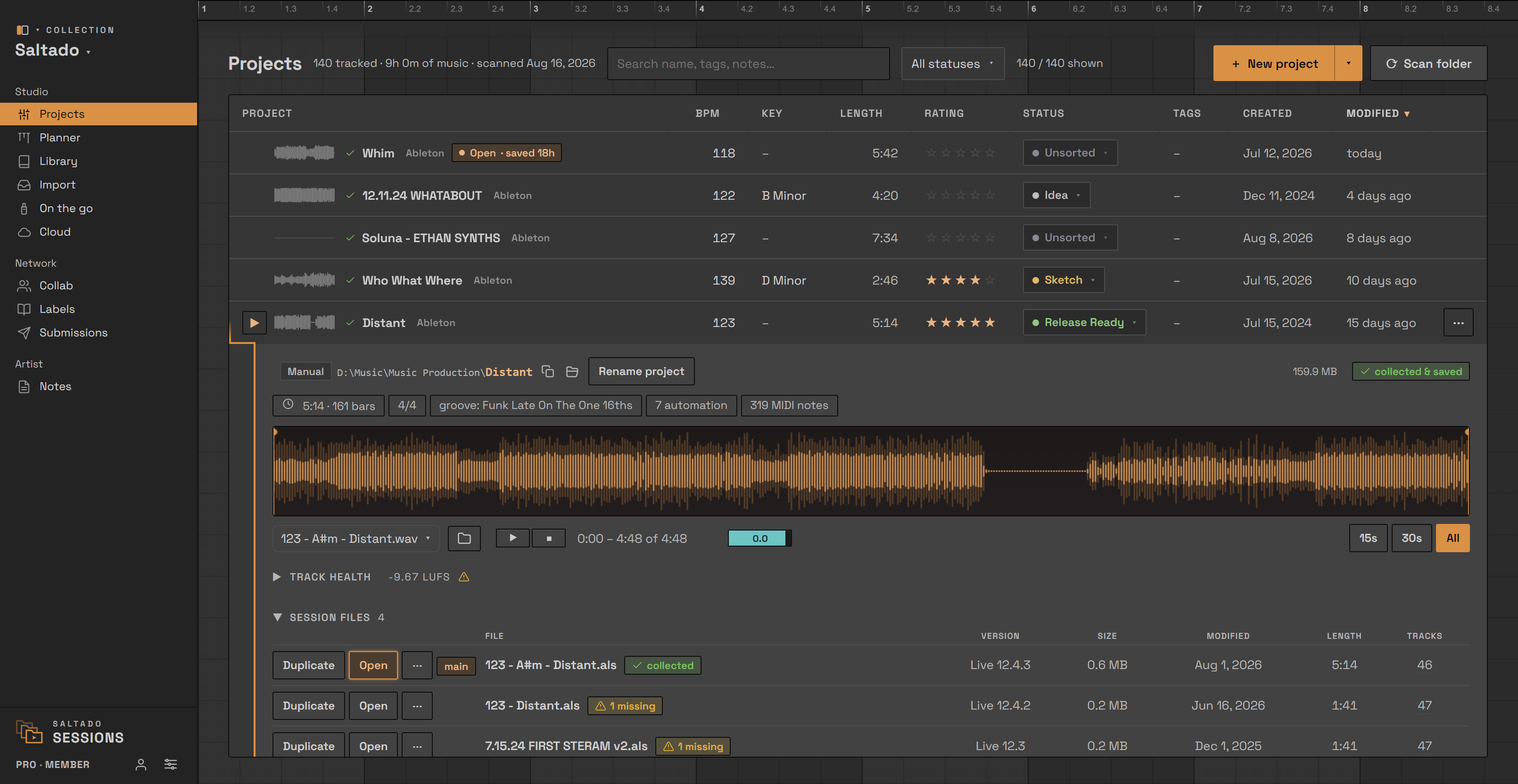
Saltado Sessions takes the other approach. It scans your projects folder, matches each project to its bounce in your exports folder, and Track health measures those bounces where they sit:
- Integrated LUFS, loudness range and true peak for each bounce, measured to ITU-R BS.1770 rather than estimated.
- The consequence in a sentence, not a number to go and look up: "Spotify will turn this down about 6.8 dB" is the line, per platform. It is written as guidance and hedged on purpose, because those reference levels move and most platforms never published one. It is never a pass or fail badge.
- The loudness curve drawn along the waveform, in its own lane with its own axis, so you can see which section is carrying the loudness, with the moments that passed full scale marked.
- A true peak over 0 dBTP is called out. The tighter -1 dBTP ceiling is shown and deliberately left uncoloured, for the reason in the caveat above.
- WAV bounces are measured. Other formats are named as unmeasured rather than guessed at, because a made-up number is worse than an honest blank.
Displaying the measurements is a Pro feature Pro, and it is worth being precise about where it sits. It is not a plugin on your master bus while you write, and it is not a browser tool you drag one file into. It is your existing bounce folder, measured in place, so the question "which of these is going to get turned down" has an answer without opening anything.
It does meter in real time, though, at the moment that suits this job: while you audition a bounce, the waveform carries a full metering console. Momentary and short-term loudness, a gated integrated reading with its signed distance from the -14 reference, true peak with a clip lamp latched per channel, phase correlation both full-band and on the low end alone, a goniometer, peak-hold level bars and a thirty-second history strip. It has a simple view that shows the headline figures at a glance and a full console view that spreads the lot across the waveform, plus switches for each group, so it can be as quiet or as complete as you want. The headline loudness figure is the maximum the track reached rather than a wandering average, because "how loud does this get" is the question you are actually asking while music is playing and you cannot watch a number the whole time. Playing those bounces back is covered in previewing projects without opening your DAW, and the rest of what the app does is on the features page.
What is free and what is Pro
- Free: the drive scan and library for unlimited projects, across eleven DAWs, with search, sort, ratings, statuses, BPM and key, the collect status on every project, the Compatibility Checker, Plugin Passport and the label book.
- Pro ($34, one time): bounce playback, Track health and the metering console, the full sample and plugin library, starting a new project from your own template, the drop-to-organize importer, the un-tangler and the duplicate-sample finder. Never a subscription.
Everything runs locally. No account, nothing about your music leaves the machine, and reading your projects and bounces is read-only.
Know where every bounce lands before you send it anywhere. Sessions measures the WAV bounces already in your exports folder and tells you, per track, what streaming will do with them.