
Clean up your Ableton projects and samples, without breaking anything
Cleaning up an Ableton projects folder works in one order: scan your drives so you can see every project you have, find the sets whose samples are missing or living outside the project folder, split any one-folder pile into a folder per song, delete duplicate samples no project references, then file new material as it arrives so it cannot pile up again. Saltado Sessions walks through all five, one reviewed step at a time, and nothing it moves is unrecoverable.
Two promises before anything else, because they are the whole point. First, the scan is read-only: pointing Sessions at your mess changes nothing. Second, when you do ask it to move something, deletes go to the Recycle Bin, moves are copy-then-verify, and every action is journaled with a one-click undo. A cleanup tool you cannot trust is worse than the mess.
Step 1
See what you actually have
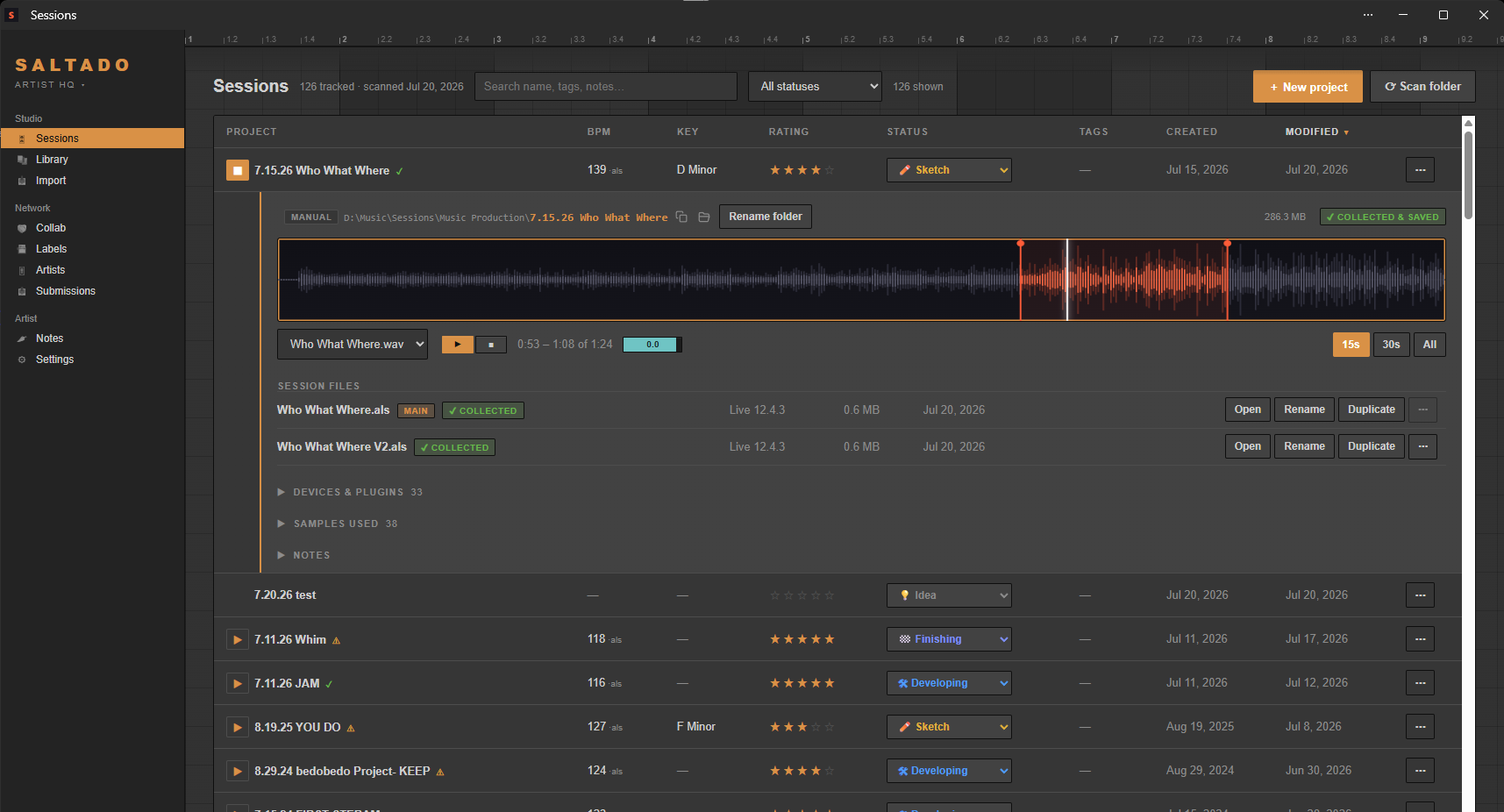
The setup wizard sweeps your drives for every project you have ever made. Ableton first, plus FL Studio, REAPER, Studio One, Logic Pro, Bitwig Studio, Cubase, Pro Tools, Reason and GarageBand: ten DAWs, so a drive you have been recording to since before you switched is still read in full. It reads BPM and key straight out of each Ableton file, pulls the plugins each project uses, and lines everything up in one sortable, searchable list. No tagging, no importing, no "just spend a weekend organizing first".
That single view is usually the moment the mess stops feeling infinite: you can see how many projects there are, which ones you touched last month, and which have sat untouched since 2023. This part is free, for unlimited projects.
Step 2
Find the projects with missing samples
Before you move anything, find out what is already broken. Sessions reads every sample reference inside each Ableton set and sorts each one into a bucket: living inside the project folder, sitting somewhere else on your drives, part of Ableton's factory content, or simply gone. Each set then reads as collected, external, or missing.
This matters most for the sets that are external rather than missing. Those still open today, because the samples are somewhere on a drive, but they are one folder rename or one unplugged external disk away from breaking. Finding them while the audio still exists is the difference between a two-minute fix and a permanently broken track. If a set is already showing missing files, the missing-samples guide walks through the rescue.
Because this reads the project file itself, it is Ableton-only, and it is free.
Step 3
Un-tangle the one-folder pile Pro
The classic mess: years of songs saved into a single Ableton project folder, all sharing one Samples directory. Everything technically works, but nothing is separable. You cannot back up one song, hand one to a collaborator, or delete one without fear.
The un-tangler splits that pile into one proper project folder per song. It is version-aware, which is the part that makes it usable: "Whim", "Whim v2" and "Whim FINAL" are recognised as three versions of one song and land together, rather than becoming three separate projects. And it copies each song's samples into its new folder, in the layout Live expects, so every folder comes out genuinely self-contained: back one up, hand one to a collaborator, or archive one whole. Nothing is ever deleted from the pile: the shared Samples directory ends the run holding every file it started with, so your old sets keep opening exactly as they did before, which is why this is safe to run on a decade of work.
You do not have to take its word for the grouping, and you do not have to do the whole pile at once. Every pile has a "see why" that opens up to show the distinct songs it thinks are in there, which session files belong to each one, and what the grouping was based on: shared samples, shared content, or nothing better than the filenames. That is where you either agree or spot the one it got wrong, before anything moves.
Then there is "detangle one at a time", which is the honest way to do this on music you care about. It takes one folder, shows you the songs it found with an Open button beside each session so you can hear the thing in Ableton before you decide, splits that one folder when you say go, then shows you what it made with an Open for each new folder and an undo for that one folder alone. Skip a pile you are unsure about, stop after two, come back next week. Entering the walkthrough and looking is free; only the run itself is Pro.
And some piles are not mistakes. A folder you deliberately keep as one project can be marked "this is intentional" and it stops being raised, for free. That mark follows the contents rather than the path, so renaming the folder keeps it dismissed, while genuinely adding or removing a session in there brings it back for a fresh look. Dismissed piles stay listed as a count you can expand and undo, so nothing is hidden from you permanently.
Step 4
Reclaim disk space from duplicate samples Pro
Every producer's library holds the same kick in six places: once from the original pack, twice from collect-and-save runs, and three more times from folders you copied "just in case". The duplicate finder matches samples by content rather than filename, so renamed copies are still caught, and it reports how many megabytes are actually recoverable.
Then it does the thing a generic duplicate finder cannot: it checks your projects. Any copy that a scanned set actually references, or that lives inside a project folder, is excluded from the delete list. That single rule is what separates a cleanup tool from a tool that silently breaks projects you will not open again for a year. Deletes still go to the Recycle Bin, so even a mistake is a right-click away from undone.
Step 5
Keep it clean Pro
Cleanup only sticks if new material stops landing wherever there was room. Drop a sample pack, a Max for Live device, a rack, a preset or a Live set from a friend onto the Import page and it gets filed and cataloged automatically: zips are extracted and verified, audio packs stay intact as packs, devices and presets go to their own folders, and projects are routed to your projects folder where the normal scan picks them up.
Cross-drive moves copy first and verify file counts and byte totals before the original is sent to the Recycle Bin, so an interrupted import cannot lose a pack. Every run is journaled with a one-click undo, and a History view records what the app did and when. If you would rather build the system by hand, there is also a guide to organizing Ableton projects with the folder-structure and naming theory.
How long does this take
The scan is the slow part, and it is unattended: point it at your drives and let it work through however many projects you have. After that, each cleanup step is a review-then-confirm action rather than a batch job you set running and hope about. Most people do step 1 and step 2 in one sitting, then handle the un-tangling and duplicates over a few evenings, because both are decisions about your own music rather than mechanical work.
There is no requirement to do all five steps, or to do them in order. The scan alone, which is free, already turns an unknowable pile into something you can search and sort.
What is free and what is Pro
- Free: the full scan and library view for unlimited projects, BPM and key, missing-sample flags, search, sort, ratings, statuses and tags. Finding the tangled piles, reading why each was grouped that way, and marking one intentional are all free too: you can see everything that is wrong with your library without paying.
- Pro ($44, one time): actually running the un-tangler, the duplicate-sample finder, and the drop-to-organize importer, plus bounce playback and the full studio library. Never a subscription.
Deep cleanup is Ableton-first: the missing-sample check, un-tangler and project-aware duplicate matching read Ableton files. Finding, previewing and managing project files works across all ten supported DAWs.